
Apple is rolling out a smart new safeguard in macOS Tahoe 26.4, designed to protect Mac users from sneaky malware tricks.
The feature spots harmful commands pasted into the Terminal app and hits pause with a clear warning: “Possible malware, Paste blocked. Your Mac has not been harmed.
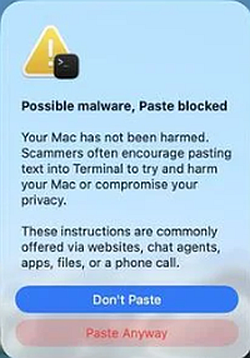
Scammers often encourage pasting text into Terminal to try to harm your Mac or compromise your privacy. These instructions are commonly offered via websites, chat agents, apps, files, or a phone call.”
This update couldn’t come soon enough. According to a Huntress cyber threat report, ClickFix powered over half of all malware loader activity in 2025. Threat actors behind it keep evolving, adding fresh tactics such as hidden malware in images and fake Windows updates, as well as new commands, such as nslookup for downloading RATs.
ClickFix is pure social engineering wizardry. It dupes victims into self-infecting their devices often with info-stealers that grab passwords, crypto wallets, and personal data.
It kicked off by targeting Windows by hijacking clipboards on fake CAPTCHA sites. Macs weren’t spared for long; soon came campaigns pushing Terminal pastes, like those that deployed the Infiniti stealer via ClickFix and Python Nuitka.
It doesn’t reveal exactly which commands trigger alerts, keeping malware authors guessing and giving defenders time to defend. It’s an extra shield for macOS users, though clicking “Paste Anyway” bypasses it, so think twice.
How to Stay Safe from ClickFix and Similar Threats
Even with built-in protections, vigilance wins. Here’s how to lock down:
- Slow down and scrutinize: Rushed decisions fuel attacks. Ignore urgency tactics like countdown timers or “live user” counters on shady sites urging Terminal commands.
- Verify before executing: Never paste code from emails, chats, or web pages Cross-check with official docs or support. Manually type commands if needed to spot hidden malice.
- Ditch untrusted sources: Stick to verified apps and sites. Tools like Malwarebytes Browser Guard already block these pastes proactively.
- Layer up security: Run real-time anti-malware like Malwarebytes with web protection. Keep macOS updated.
- Stay informed: Threats mutate fast. Follow blogs for the latest on CVEs and IOCs.
ClickFix proves attackers prey on trust and haste. macOS Tahoe 26.4 raises the bar, but user awareness is the ultimate firewall. In a world of evolving cybercrime, blending tech defenses with smart habits keeps your Mac (and data) secure.
Site: cybersecuritypath.com
About the Author