Fake Google Security Check Delivers Browser-Based RAT
A sophisticated phishing campaign masquerading as a Google Account security check, deploying one of the most advanced browser-based remote access trojans (RATs) observed to date. This threat leverages legitimate web technologies to achieve persistent surveillance without traditional malware installation, primarily targeting Android users but affecting multiple platforms.
Attack Mechanics
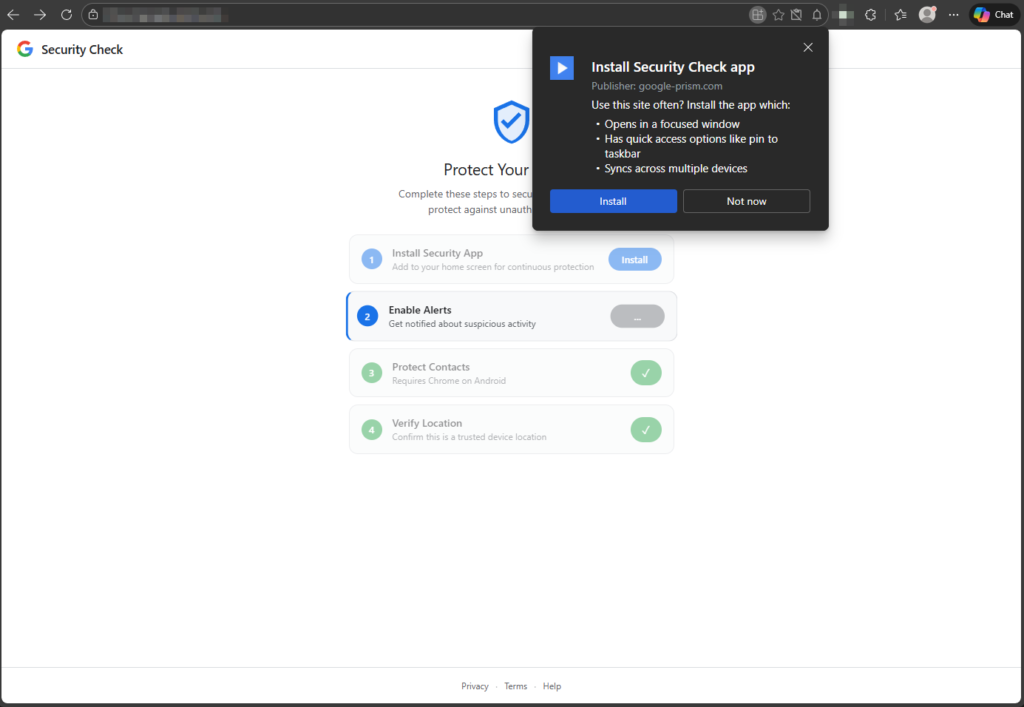
The campaign begins with a phishing site mimicking Google’s security alert page, prompting users through a deceptive four-step “checkup” process. Victims are first asked to “install” a Progressive Web App (PWA), which pins to the home screen and hides the browser address bar, creating the illusion of a native Google app.
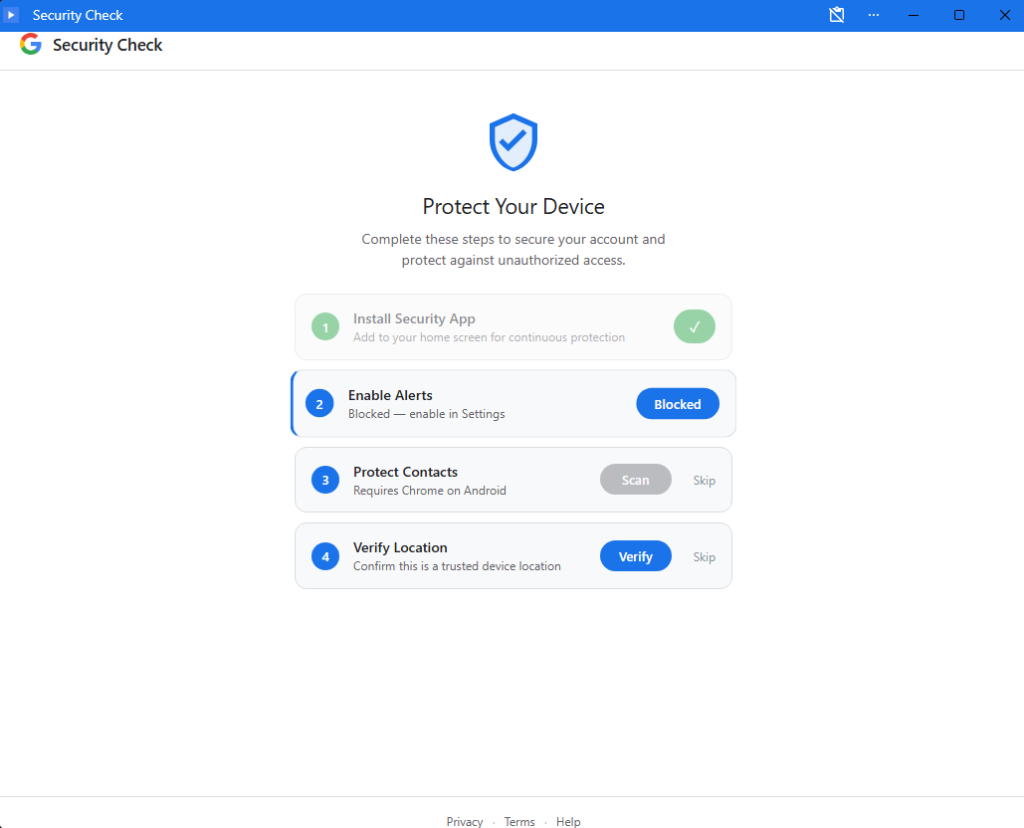
Subsequent steps request permissions framed as protective measures: notification access for “security alerts,” contact sharing via the Contact Picker API (exfiltrating selected contacts to the attacker’s server), and geolocation for “identity verification” (sending latitude, longitude, altitude, speed, and heading).
The PWA comprises two key components: a page script active during use, which monitors the clipboard for OTPs and crypto wallet usage via the browser OTP API, fingerprints devices, and polls the C2 endpoint /api/heartbeat every 30 seconds; and a persistent service worker.
The service worker endures tab closure, handling push notifications for command execution, background sync for offline data queuing in Cache API (keys like /exfil/{timestamp}-{random}), and periodic sync (tag: c2-checkin) on Chromium browsers for scheduled check-ins, ensuring long-term access even weeks later.
Advanced Exploitation Features
A standout capability is the WebSocket-based proxy relay, allowing attackers to route arbitrary HTTP requests through the victim’s browser, bypassing IP restrictions and accessing corporate internal resources from the victim’s network. This fetch() proxy supports custom methods, headers, credentials, and bodies, returning full responses.
Network reconnaissance is enabled via a timing-based port scanner targeting the local subnet (all 254 IPs on ports 80, 443, 8080) within browser sandbox limits. Attackers can also remotely execute JavaScript via eval commands over WebSocket, potentially delivering secondary payloads.
Data exfiltration is resilient: offline captures (e.g., clipboard, GPS, OTPs) are queued locally and flushed upon reconnection via Background Sync, and are deleted only after server acknowledgment. The C2 infrastructure centers on Google-Prism.com, which is routed through the Cloudflare CDN.
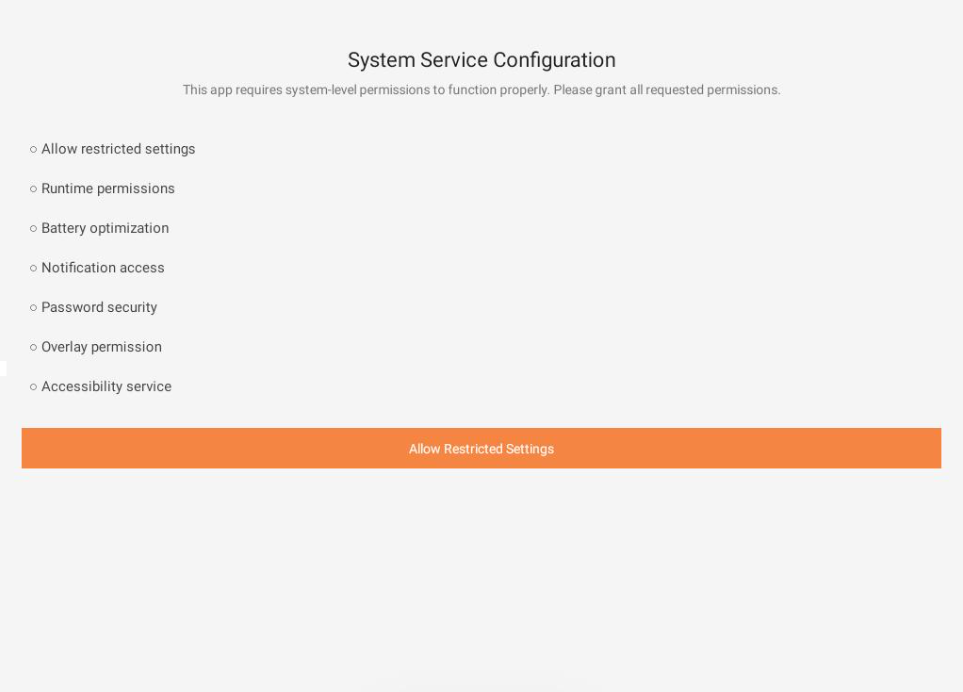
For fully compliant victims, the PWA prompts an APK download disguised as “Version 2.1.0 · 2.3 MB · Verified by Google” (sync.apk, 122 KB, package com.device.sync, labeled “System Service”). This implant requests 33 permissions, including SMS, call logs, microphone, contacts, and accessibility services.
Key features include a Keytom keyboard, a keylogging and notification listener for 2FA interception, an accessibility service for screen reading and actions, and an autofill service for credential theft, guided by the PWA’s “Enable Autofill” screen. Persistence via device admin registration, boot receiver, alarms, and overlay UI for phishing completes the toolkit.
Technical Analysis and MITRE Mapping
Analysis reveals abuse of web standards: Contact Picker API (T1539), WebOTP (T1114), Geolocation API (T1595), Service Workers (T1123), Push API (T1071.001), Cache/Background Sync (T1560.001). The proxy aligns with T1090/T1572, port scanning (T1046), and keylogging (T1056.002).
The SHA-256 hash 1fe2be4582c4cbce8013c3506bc8b46f850c23937a564d17e5e170d6f60d8c08 confirms the APK; no extensions or exploits are used, pure social engineering.
Google never requests PWA installs or permissions via pop-ups; verify at myaccount.google.com. On Android, uninstall the “Security Check” PWA and “System Service” (revoke admin first), clear notifications/autofill, scan, or perform a factory reset if persistent.
For Chromium: remove via chrome://apps, unregister service workers (chrome://serviceworker-internals), clear site data/notifications. Firefox: about:serviceworkers, clear data. Safari: delete home screen app, revoke notifications, clear website data.
Change compromised passwords, enable app-based 2FA, and monitor for IOCs. This threat highlights PWA risks and urges browser vendors to enhance permission warnings.
Site: cybersecuritypath.com
About the Author