OAuth Redirection Abuse Enables Phishing Campaigns and Malware Delivery
Microsoft Defender researchers have uncovered sophisticated phishing campaigns exploiting OAuth’s legitimate redirection features to target government and public-sector organizations, bypassing traditional email and browser defenses.
These attacks leverage silent authentication flows with invalid scopes to redirect users to malicious sites without stealing tokens.
OAuth Redirection Abuse Enables Attacks
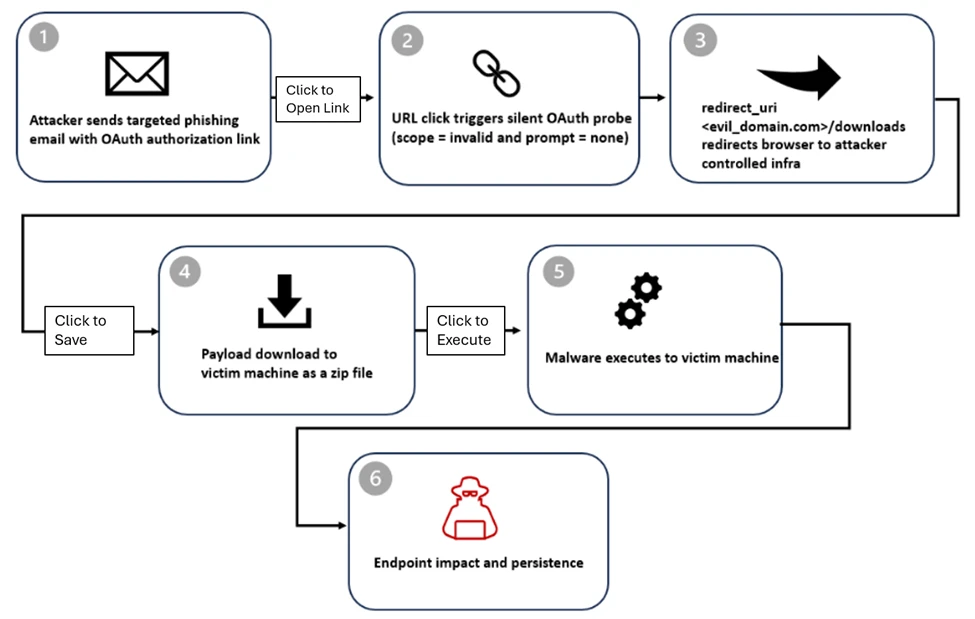
OAuth 2.0 protocols, including RFC 6749 and RFC 9700, define error-handling redirects that attackers abuse by registering malicious apps in controlled tenants with redirect URIs pointing to attacker infrastructure.
Crafted URLs mimic legitimate authorization requests from providers like Microsoft Entra ID or Google Workspace, using parameters such as prompt=none and invalid scope values to force silent failures and trigger redirects.
For Entra ID, a typical malicious URL is: https://login.microsoftonline.com/common/oauth2/v2.0/authorize?client_id=<app_id>&response_type=code&scope=<invalid_scope>&prompt=none&state=<value>. The /common/ endpoint targets all tenants broadly, while prompt=none ensuring no UI interaction, guaranteeing an error redirect to the attacker’s domain.
Attack Stages
Threat actors distribute phishing emails with themes like document sharing, Social Security alerts, Teams meetings, password resets, or employee reports, often embedding URLs directly or in PDF attachments. Some use free mass-mailers, Python/Node.js scripts, or cloud services for delivery; lures may include fake .ics calendar invites for credibility.
- Stage 1: Delivery – Victim clicks the OAuth URL in the home email.
- Stage 2: Silent Probe – Invalid parameters trigger error without auth UI.
- Stage 3: Error Redirect – Browser sent to attacker’s URI, e.g.,
https://<attacker-domain>/download/XXXX?error=interaction_required&state=<encoded_email>confirming account existence. - Stage 4: Payload Drop – Auto-downloads a ZIP file containing LNK files, leading to HTML smuggling or phishing kits such as EvilProxy.
- Stage 5: Endpoint Compromise – LNK executes PowerShell for recon (
ipconfig /all,tasklist), extractssteam_monitor.exe, and side-loads maliciouscrashhandler.dllcode to decrypt and run the C2 payload in memory.
The state parameter carries encoded victim emails (plaintext, hex, Base64, or custom schemes) for pre-populated phishing pages.
This abuse aligns with RFC 9700 Section 4.11.2, warning of “Authorization Server as Open Redirector” via invalid scope or prompt=none, turning standards-compliant errors into phishing vectors. No tokens are stolen error code 65001 blocks access, but trusted domains evade filters, enabling rapid domain rotation.
Detections and IOCs
Microsoft Defender XDR queries detect invalid scopes in UrlClickEvents, DeviceEvents, and PowerShell/DLL side-loading. Antivirus flags include Trojan:Win32/Malgent, Trojan:Win32/WinLNK.
Key IOCs:
- Client IDs: 9a36eaa2-cf9d-4e50-ad3e-58c9b5c04255, 89430f84-6c29-43f8-9b23-62871a314417, etc.
- Domains: dynamic-entry.powerappsportals[.]com, login-web-auth.github[.]io
Govern OAuth apps: turn off user consent, audit permissions, remove unused ones; enforce Conditional Access and XDR across email/identity/endpoint. Block IOCs, monitor prompt=none URLs in phishing themes, and enable enhanced logging for proactive hunts
Site: cybersecuritypath.com
About the Author