%20(1).webp "Technitium: Self-Hosted DNS Server for Enhanced Privacy and Security")
Technitium: Self-Hosted DNS Server for Enhanced Privacy and Security
Where your ISP logs every website you visit and advertisers track your every click, who really controls your internet? Most folks don’t think twice about DNS, the Domain Name System, the quiet hero that translates “google.com” into an IP address so your browser can load pages.
But here’s the kicker: your default setup often hands that power straight to your ISP or big public resolvers like Google or Cloudflare. They see it all, even with HTTPS encrypting your traffic.
Enter Technitium DNS Server, an open-source powerhouse that’s making self-hosting your own DNS easier than ever. It’s authoritative and recursive, runs out of the box, and packs features that turn your home lab or office network into a privacy fortress.
I first stumbled on Technitium a couple of years back while tinkering with Pi-hole alternatives. Tired of ads sneaking through and wanting absolute control, I spun it up on a Raspberry Pi. What hooked me? It just works, no PhD in networking required.
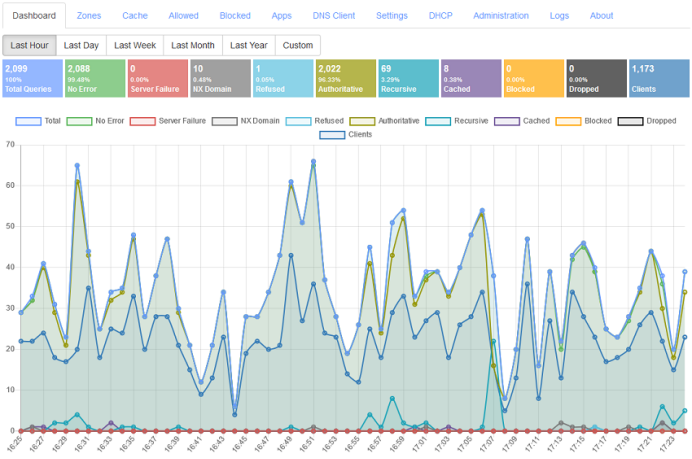
A sleek web console pops up in your browser. Boom, you’re blocking malware, caching queries for speed, and routing traffic over encrypted protocols like DNS-over-TLS (DoT), DNS-over-HTTPS (DoH), or even the speedy DNS-over-QUIC.
Why Bother with a Local DNS Server?
Picture this: You’re streaming Netflix, but your ISP throttles it because they “prioritize” its own services. Or worse, they inject ads or block sites during “network maintenance.”
Public DNS helps a bit, but ISPs can still snoop or hijack queries via UDP, the default protocol. Technitium flips the script by running locally on Windows, Linux, macOS, or Raspberry Pi, intercepting all your network’s DNS traffic.
The perks hit hard:
Privacy Boost: Forward queries to encrypted upstream services such as Quad9 or AdGuard. Your ISP sees nothing but chatter to your local server.
Speed Gain: Cache responses persistently, so repeat visits to nytimes.com load instantly without upstream round-trip.
Network Insight: Logs and stats reveal who’s querying what, great for spotting infected devices or kids bypassing filter.
Control Freak’s Dream: Block domains network-wide, set up split-horizon views, or geofence responses.
In my tests on a modest Intel i7 setup, it handled over 100,000 queries per second over Gigabit Ethernet. That’s enterprise-grade without the bill.
Set up: From Zero to Hero in Minutes
Technitium shines in simplicity. Grab the Windows installer from their site, or for Linux/RPi, follow their Ubuntu guide; it’s a quick apt install plus .NET 9. Docker fans? Pull technitium/dns-server from Docker Hub and tweak the compose file.
Portable builds work anywhere .NET runs. First boot? Web console at http://localhost:5380. Set your forwarders (e.g., Cloudflare’s 1.1.1.1 over DoH), enable blocklists like StevenBlack’s hosts, and point your router’s DHCP to your server’s IP (usually 192.168.1.x:53).
No config hell. It auto-detects networks, supports IPv6, and even bundles a DHCP server for multi-subnet setups.
Feature Deep Dive: Privacy Meets Power
Technitium isn’t just a resolver; it’s a Swiss Army knife with core modes: recursive (looks up anything) or authoritative (hosts your zones). Cluster multiple instances for HA and manage them from a single console, as detailed in their November 2025 blog on clustering.
Privacy and Encryption Stars:
Self-host DoT (RFC 7858), DoH (RFC 8484 with HTTP/1.1/2/3), and DoQ (RFC 9250).
Proxy protocol v1/v2 for load balancers.
QNAME minimization (RFC 9156) and case randomization to dodge eavesdroppers.
Latency-based upstream selection with concurrency always picks the fastest resolver.
Blocking and Security:
One-click blocklists for ads/malware; regex support via apps for client-specific rules (e.g., stricter for IoT devices).
DNSSEC validation (RSA/ECDSA/EdDSA, NSEC/NSEC3) across all protocols.
DANE TLSA (RFC 6698) for cert pinning generates hashes from PEM files.
Rebinding protection app stops sneaky attacks.
CNAME cloaking and ANAME flattening for apex CNAMES.
Advanced DNS Wizardry:
SVCB/HTTPS records (draft), URI (RFC 7553), SSHFP (RFC 4255).
Catalog zones (RFC 9432) auto-provision secondaries.
Dynamic updates (RFC 2136) with TSIG (RFC 8945).
Zone transfers: AXFR/IXFR (RFC 1995/1996), over TLS/QUIC (RFC 9103/9250), with ZONEMD validation (RFC 8976).
DNS64 for IPv6-only clients, DNSBL hosting, EDNS(0)/ECS (RFC 6891/7871), extended errors (RFC 8914).
Custom “APP” records let you script responses, build split-horizon or geo-blocks.
Ops and Extensibility:
Multi-user RBAC, TOTP 2FA, API tokens, full HTTP API (docs on GitHub).
Query/system logs, out-of-order TCP/TLS processing (RFC 7766).
Tor/Cloudflare hidden resolver via HTTP/SOCKS5 proxies.
Dark mode web UI because late-night tinkering.
Recent v14 (Nov 2025) amps it up with better QUIC/HTTP3, as covered in their release notes and XDA’s August 2025 rave, calling it the best local DNS tool.
Real-World Wins: Home Lab to Enterprise
For home users, it’s Pi-hole on steroids. Block YouTube ads network-wide (their 2020 blog has the how-to) or enforce SafeSearch. Self-host your domain? Wildcards, aging records, and DNSSEC-signed zones make it seamless pair with Certbot for auto-renewals via DNS challenges (2023 guide).
Pros love it for segmentation. Run stub/conditional forwarders for internal zones (e.g., Active Directory) and bulk-forwarding apps for complex setups.
In orgs, clustering + stats uncovered shadow IT or APT beacon logs that showed a malware C2 in my simulated red-team test.
Blogs echo this: Scott Hanselman’s 2019 .NET exploration, Toptal’s 2020 DoH/DoT deep-dive, and phra’s 2019 C2 exfil post (ironically highlighting why local control matters).
Challenges and Tips
It’s not a perfect resource-heavy on low-end hardware (min 2GB RAM). Learning curve for DNSSEC/DANE? If you’re new, hit their help topics or Reddit’s r/technitium. Windows installs occasionally gripe about ports; firewall tweaks fix it.
Pro Tip: Start recursive, add blocks, then authoritative zones. Test turns off, letting you toggle without downtime. For prod, cluster two VMs and enable persistent cache.
The Bigger Picture: Why Technitium Matters Now
According to Github, With 2025’s surge in ISP meddling (remember those EU net neutrality fights?) and rising C2-over-DNS attacks, self-hosting isn’t optional; it’s essential. Technitium, .NET 9-built and GitHub-hosted, stays ahead: v13 (2024) nailed catalog zones, v12 bulk forwarding. Donate via Patreon to fuel it.
site: cybersecuritypath.com
About the Author


